

EdgeBrowser - A Slider Control
Access has no slider control - the acEdgeBrowser does. This article shows how an HTML slider is built inside the browser control, how the value gets back into VBA, and why the right moment matters more than raw speed.
Two worlds, one bridge
Access has no slider control. The acEdgeBrowser, on the other hand, displays anything a modern browser knows - including an <input type="range">. Showing it is the easy part. The interesting question is how the value gets back into VBA.
Because two separate worlds meet here:
| Access / VBA | WebView2 / HTML + JavaScript | |
|---|---|---|
| Language | VBA | JavaScript |
| Execution | one single UI thread | its own process, its own memory |
| Behaviour | step by step, waits for every answer | event driven, waits for nobody |
| Pace | as fast as the code runs | 60 frames per second, one frame = 16.7 ms |
The two sides share neither memory nor variables, and they cannot call each other. What is missing is a bridge.
What the acEdgeBrowser provides
The control is not the complete WebView2 API. What is available:
| Task | In the acEdgeBrowser |
|---|---|
| Run JavaScript | ExecuteJavascript - no return value, cheap |
| Read a value from the page | RetrieveJavascriptValue - synchronous, expensive |
| Page calls VBA | does not exist - no web-message event |
| Navigation | Navigate "https://msaccess/" & <path> |
| Feedback after loading | DocumentComplete - fires twice per navigation |
| Mouse events | Click, MouseUp(Button, Shift, X, Y) |
The third row shapes the whole architecture: the page cannot knock on the door. Access has to go and look - and therefore decides for itself when traffic crosses the bridge.
The structure: three modules
| Module | Purpose |
|---|---|
clsWebBridge | The generic transport. This class is identical for every webControl - slider, combo box, tree view. It knows nothing about sliders. |
clsSlider | The domain logic. Minimum, maximum, default, colours; turns raw browser traffic into a single ValueChanged event. |
modSliderHtml | The page itself, as a VBA string inside the project. No external HTML file that can go missing or fall out of sync with the code. |
modWebBridge | Stateless helpers: the central error box, JSON parsing, writing a UTF-8 file. |
On top of that comes the host form with an acEdgeBrowser control and a text box for the output.
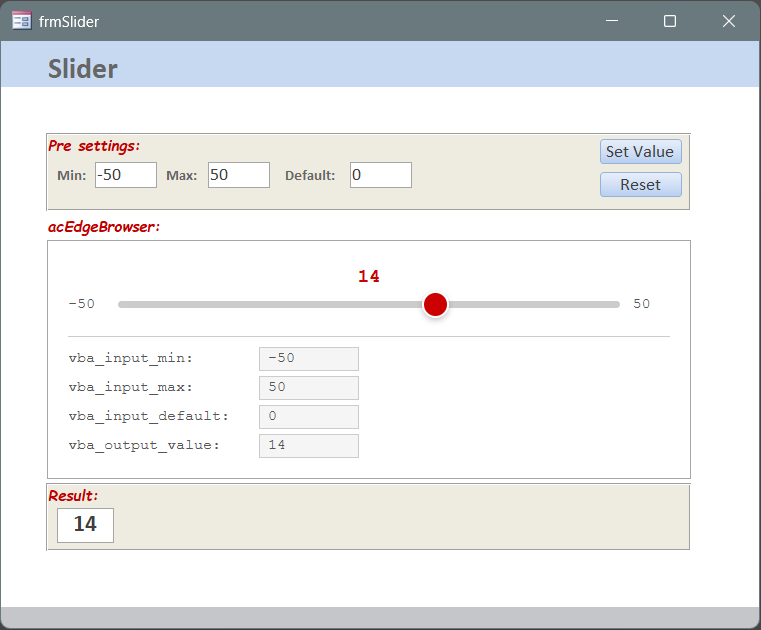
The page: HTML produced by VBA
modSliderHtml returns the complete page - CSS, body and JavaScript - as a string. Because the page lives inside the project, it cannot drift away from the code base.
Markers instead of placeholders
At every variable position the page carries a marker that is a valid JavaScript comment in its own right. clsSlider replaces them before loading:
    sHtml = Slider_EmbeddedHtml()
    sHtml = Replace(sHtml, "/*__STYLE__*/{}", StyleJson())
    sHtml = Replace(sHtml, "/*__MIN__*/0", CStr(m_lngMin))
    sHtml = Replace(sHtml, "/*__MAX__*/100", CStr(m_lngMax))
    sHtml = Replace(sHtml, "/*__DEFAULT__*/50", CStr(m_lngDefault))
    sHtml = Replace(sHtml, "/*__SHOWFIELDS__*/false", IIf(m_bolShowFields, "true", "false"))
This has two benefits. First, the very first painted picture is already correct - range, colours and field visibility are in the HTML, nothing has to be sent afterwards. Second, the page can be opened unchanged in a normal browser: without replacement the markers are simply comments, and the defaults apply.
Setting properties before Init is cheaper: ShowFields and the four colour properties are baked into the HTML when they are set before Init is called. Setting them afterwards achieves the same thing - but through a call into the already loaded page.
The letterbox inside the page
Since the page cannot call VBA, it drops its messages into a letterbox and Access empties it whenever that suits. The letterbox is a small JavaScript object that modSliderHtml ships with the page:
    s = s & "    var WebBridge={queue:[]," & vbLf
    s = s & "      send:function(a,d){var o={action:a};if(d){for(var k in d)o[k]=d[k];}" & _
            "for(var i=0;i<this.queue.length;i++){if(this.queue[i].action===a){this.queue[i]=o;return;}}" & _
            "this.queue.push(o);}," & vbLf
    s = s & "      collect:function(){if(!this.queue.length)return '';var r=JSON.stringify(this.queue);this.queue=[];return r;}};" & vbLf
send() posts a letter, collect() empties the box in one move and returns the contents as JSON. The decisive trick is inside send(): a letter replaces a waiting letter of the same kind instead of queueing up behind it. The box therefore always holds exactly one letter, and it always carries the current value.
The path of the value
What the page does
While dragging, the input event fires once per mouse move. The page then does two things - both stay entirely inside the browser:
    s = s & "    slider.addEventListener('input',function(){var v=parseInt(this.value,10);" & _
            "showValue(v);WebBridge.send('change',{value:v});});" & vbLf
showValue() merely remembers the number and lets it be painted on the next animation frame - so the display is updated at most once per frame instead of several times per frame in vain. send() refreshes the waiting letter.
Why it sends on every move: because send() replaces instead of appending, this costs nothing - there is never more than one entry. The benefit is that the letter is already waiting before the user lets go. Whenever Access looks, it finds the current value.
On release, the change event fires as well. That is where the value is committed and written into the vba_output_value field.
When VBA looks
RetrieveJavascriptValue is synchronous: the call stops the Access UI thread and forces the renderer to halt in the middle of drawing a frame. It is not slow, but it is expensive - which is why the bridge is very deliberate about when it happens.
Two Windows API functions provide the necessary information:
#If VBA7 Then
    Private Declare PtrSafe Function GetLastInputInfo Lib "user32" (ByRef plii As LASTINPUTINFO) As Long
    Private Declare PtrSafe Function GetTickCount Lib "kernel32" () As Long
    Private Declare PtrSafe Function GetAsyncKeyState Lib "user32" (ByVal vKey As Long) As Integer
#Else
    Private Declare Function GetLastInputInfo Lib "user32" (ByRef plii As LASTINPUTINFO) As Long
    Private Declare Function GetTickCount Lib "kernel32" () As Long
    Private Declare Function GetAsyncKeyState Lib "user32" (ByVal vKey As Long) As Integer
#End If
GetAsyncKeyState answers the question “is the left mouse button down right now?” - and with it, “is a drag in progress?”:
Private Function MouseIsDown() As Boolean
On Error Resume Next
    MouseIsDown = (GetAsyncKeyState(C_VK_LBUTTON) < 0)
End Function
Because this is checked on every timer beat, the bridge also knows the edge from down to up. That edge is the end of the drag. The core of HandleTimer therefore consists of four cases:
    ' ---- (1) The page is not up yet: make sure it ever will be ----
    If Not m_bolReady Then
        CheckLoadStalled
        GoTo END_PROCEDURE
    End If

    ' ---- (2) Button held: never interrupt a drag ----
    bolDown = MouseIsDown()
    If bolDown Then
        m_bolMouseWasDown = True
        GoTo END_PROCEDURE
    End If

    ' ---- (3) Button just released: the interaction is over, take the value NOW ----
    If m_bolMouseWasDown Then
        m_bolMouseWasDown = False
        ReadQueue
        GoTo END_PROCEDURE
    End If

    ' ---- (4) Keyboard and friends: wait for a pause in the input ----
    If TickDelta(m_lngLastRead, GetTickCount()) < m_lngMaxWaitMs Then
        If IdleMs() < m_lngGateMs Then GoTo END_PROCEDURE
    End If

    ReadQueue
Case 2 guarantees that not a single read happens while the thumb is being dragged. Case 3 fetches the value on the first beat after the release. Case 4 catches everything the mouse does not announce - keyboard operation above all: it reads once the user has been still for 150 ms, and after 3 seconds at the latest.
Because a beat now costs almost nothing, the timer is allowed to run fast: 60 ms. That is at the same time the maximum delay with which a value appears in the form.
If the control raises MouseUp or Click, the host form can additionally call FlushNow and fetch the value one beat earlier. That is not required - the bridge recognises the end of the drag on its own anyway.
What becomes of the letter
ReadQueue is the only place that actually reaches into the page. One call empties the entire letterbox, whether it holds one entry or twenty:
    sRaw = Nz(m_objWebCtrl.RetrieveJavascriptValue("WebBridge.collect()"), "")
    If Len(sRaw) = 0 Then GoTo END_PROCEDURE

    sJson = UnwrapJsString(sRaw)
    If Len(sJson) = 0 Or sJson = "[]" Or sJson = "null" Then GoTo END_PROCEDURE

    Set colCmd = SplitJsonArray(sJson)
    For Each vItem In colCmd
        sCommand = CStr(vItem)
        sAction = ExtractJSONValue(sCommand, "action")
        If Len(sAction) > 0 Then
            RaiseEvent CommandReceived(sAction, sCommand)
        End If
    Next vItem
clsSlider receives that event, checks the content and passes it on to the form as a typed event:
    If sAction = "change" Then
        sValue = ExtractJSONValue(sPayload, "value")
        If IsNumeric(sValue) Then
            RaiseEvent ValueChanged(ClampLong(CLng(sValue), m_lngMin, m_lngMax))
        End If
    End If
Everything that crosses the bridge is text. So the code verifies that it really is a number and then clamps the value into the valid range.
The life cycle
Opening
Form_Load only prepares and arms a one-shot. The page is loaded from the first timer beat, once the form is fully built:
    WireEvents
    m_bolStarted = False
    Me.TimerInterval = C_PACE_BOOT      ' 200 ms
If Not m_bolStarted Then
m_bolStarted = True
Me.TimerInterval = C_PACE ' 60 ms
StartSlider
GoTo END_PROCEDURE
End IfStartSlider creates clsSlider, sets the properties and calls Init. The bridge writes the finished page to %TEMP% as a UTF-8 file and navigates there. Every load gets its own address, and older files of the same control are removed first:
    Kill Environ$("TEMP") & "\ws_" & m_sControlName & "_*.html"

    m_sTempFile = NextTempHtmlPath(m_sControlName, CStr(GetTickCount()) & "_" & m_lngLoadTries)
    If Not WriteUtf8File(m_sTempFile, m_sHtml) Then
        ErrBox 9102, "Could not write temp HTML file.", C_MODULE, C_PROC, "Path: " & m_sTempFile
        GoTo END_PROCEDURE
    End If

    m_bolReady = False
    m_bolDocExpected = True
    m_lngNavStart = GetTickCount()
    m_objWebCtrl.Navigate "https://msaccess/" & m_sTempFile
m_lngNavStart starts the supervision of the load. If the page does not report DocumentComplete within 1.5 seconds, the navigation is repeated - up to three times, followed by one clear message:
    If Not m_bolDocExpected Then GoTo END_PROCEDURE
    If TickDelta(m_lngNavStart, GetTickCount()) < C_LOAD_WAIT_MS Then GoTo END_PROCEDURE

    If m_lngLoadTries >= C_LOAD_MAXTRY Then
        m_bolDocExpected = False
        ErrBox 9103, "The page never reported DocumentComplete - the browser control stayed " & _
               "empty.", C_MODULE, C_PROC, "Control: [" & m_sControlName & "]"
        GoTo END_PROCEDURE
    End If

    m_lngLoadTries = m_lngLoadTries + 1
    NavigateNow
When DocumentComplete arrives, only the first report is evaluated - the event fires twice per navigation. From that moment on the bridge is ready.
Closing
On closing, the order matters. Form_Unload stops the timer first, then Destroy releases the bridge - flags first, reference last:
On Error Resume Next

    m_bolReady = False
    m_bolDocExpected = False
    m_bolBusy = False
    m_bolMouseWasDown = False
    Set m_objWebCtrl = Nothing

    If Len(m_sTempFile) > 0 Then Kill m_sTempFile
From the first line onwards the class no longer addresses the control - neither reading nor writing - and the load supervision rests as well. The value the user last set was collected long before this point.
Cost of the individual steps
| Step | Order of magnitude | Verdict |
|---|---|---|
| Assemble the HTML in memory | about 1 ms | negligible |
| Write the temp file (ADODB.Stream) | 2 - 5 ms | negligible |
ExecuteJavascript (push a value in) | about 1 ms | nobody waits for an answer |
RetrieveJavascriptValue (one read) | 1 - 10 ms | stops both sides |
| Load, parse and render the page | 150 - 400 ms | paid once, when opening |
For context: these are orders of magnitude, not a measurement series - they depend on the machine, the WebView2 version and the size of the page. The ratio between the rows is the point, not the absolute figure.
Building the page dominates everything else, but it cannot be influenced: that is a complete browser engine constructing a document in its own process. Precisely for that reason the price is paid once, at load time, and everything after that goes the cheap way. The read, by contrast, is small - and it is the only item whose timing is freely chosen.
Properties, methods, event
clsSlider is the interface for the host form:
| Element | Meaning |
|---|---|
Init web, sName, lngMin, lngMax, lngDefault | Binds the control and loads the page. Call once. |
HandleTimer | Call from Form_Timer. The bridge decides for itself whether the moment is right. |
HandleNavigationComplete | Call from DocumentComplete. |
FlushNow [bolForce] | Optionally call from MouseUp / Click - fetches the value without any wait. |
Reset | Returns to the default value, live and without reloading. |
ApplyRange lngMin, lngMax, lngDefault | Changes the range at run time, live and without reloading. |
Destroy | Call from Form_Close. |
ShowFields | Shows or hides the vba_* fields and the line beneath them. |
BackColor, ForeColor, AccentColor, ObjectColor | Colours as #rrggbb. The lighter dragging variant and the glow ring are derived from AccentColor automatically. |
DefaultValue | Reads the current default value. |
ValueChanged(lngValue) | The one event the form listens to. |
The bridge’s reading behaviour can be tuned as well: PollGateMs is the required pause in user input (default 150 ms), PollMaxWaitMs the ceiling after which it reads even without a pause (default 3000 ms).
Conventions and limits
| Point | What to watch out for |
|---|---|
| Event properties | A .cls import does not set them. Me.OnTimer = "[Event Procedure]" belongs in the code, otherwise Form_Timer never fires - silently and without an error. |
DocumentComplete | Fires twice per navigation. Only the first one counts. |
| Colours | Only #rrggbb is accepted. That validation doubles as the protection against injected CSS or JavaScript. |
| Temp files | Live in %TEMP%, one set per control name. Several webControls on one form never collide. |
| Drag and drop | Native HTML5 drag does not work reliably in the hosted browser. For your own controls: use mouse events. |
| Late binding | Throughout, including ADODB.Stream. No references needed, 32 and 64 bit run unchanged. |
Keep the closing order. If you build your own host form: stop the timer first, then call Destroy - and read nothing from a control that is being torn down. A synchronous access in that phase can leave the WebView2 host in a state in which the next instance will not start.
Putting it to work
Import four modules: modWebBridge, clsWebBridge, clsSlider, modSliderHtml. The form needs an acEdgeBrowser control, here webSlider, plus a text box for the output.
The rest is short:
Private WithEvents m_objSlider As clsSlider
Private m_bolStarted           As Boolean


Private Sub Form_Load()
    Me.OnTimer = "[Event Procedure]"
    Me.TimerInterval = 200              ' one-shot: it loads the page right away
End Sub


Private Sub Form_Timer()
    If Not m_bolStarted Then
        m_bolStarted = True
        Me.TimerInterval = 60
        Set m_objSlider = New clsSlider
        m_objSlider.ShowFields = True
        m_objSlider.AccentColor = "#cc0000"
        m_objSlider.Init Me.webSlider, "webSlider", -50, 50, 0
        Exit Sub
    End If
    If Not m_objSlider Is Nothing Then m_objSlider.HandleTimer
End Sub


Private Sub webSlider_DocumentComplete(URL As Variant)
On Error Resume Next
    If Not m_objSlider Is Nothing Then m_objSlider.HandleNavigationComplete
End Sub


Private Sub m_objSlider_ValueChanged(ByVal lngValue As Long)
    Me.txtOutput.Value = lngValue
End Sub


Private Sub Form_Close()
On Error Resume Next
    Me.TimerInterval = 0
    If Not m_objSlider Is Nothing Then m_objSlider.Destroy
    Set m_objSlider = Nothing
End Sub
Optionally add webSlider_MouseUp and webSlider_Click, each calling m_objSlider.FlushNow.
For a second slider on the same form, a second clsSlider instance with its own control and its own name is enough - clsWebBridge creates its temp file per control name, and both instances work independently of each other.
Download
Voraussetzungen: Microsoft 365, Access 2024+, 32/64-bit